The competency matrix top companies use to track employee skills
Organizations using competency matrices report faster time-to-competency for new hires and fewer compliance violations. This comprehensive guide reveals the framework top companies use to track employee skills, featuring a proven 6-step process, real examples from healthcare to manufacturing, and a free Excel template to get you started.

 Reviewed by Adam Kohut
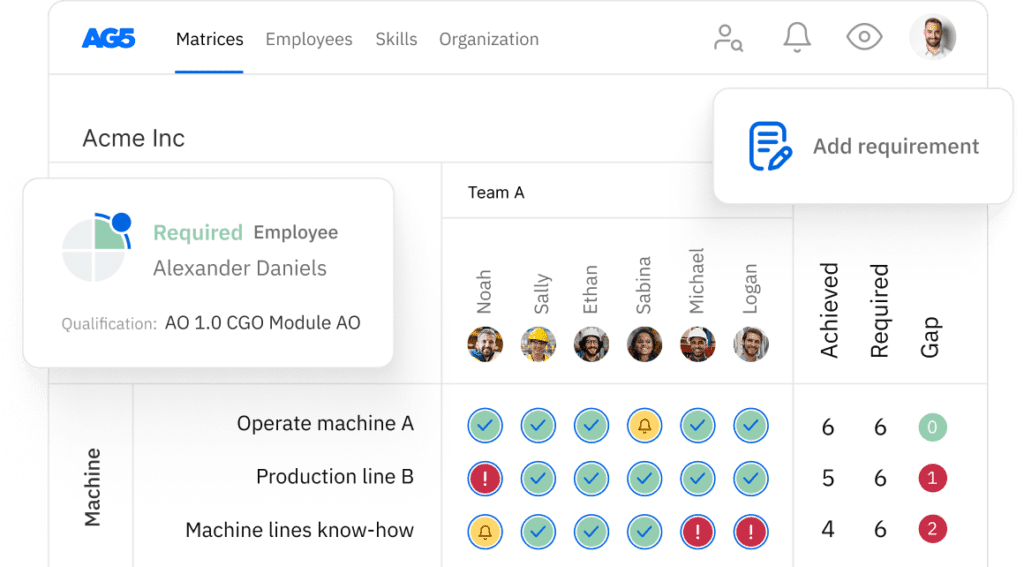
A competency matrix is a powerful visual tool that maps required competencies, including skills, knowledge, behaviors, and attitudes, against roles or employees with associated proficiency levels. It provides organizations with a clear overview of workforce capabilities, helps identify gaps, and enables strategic training and development planning.
This comprehensive guide explains what a competency matrix is, how to apply it in team management, how to build one step-by-step, how it compares to a skills matrix, and how to manage it at scale with modern software like AG5.
What is a competency matrix?Copied
Competency matrix definition
A competency matrix combines a competency model (defining what “good” looks like) with a matrix format (showing who has what, at what level). Unlike a simple skills checklist, a competency represents a cluster of knowledge, skills, behaviors, attributes, and motives that correlate with job performance, not just a single technical ability.
For example, “project management” as a competency encompasses technical skills (using project software), knowledge (understanding methodologies), behaviors (proactive communication), and attributes (attention to detail). This holistic view makes competency matrices more strategic than basic skills tracking.
What does a competency matrix look like?
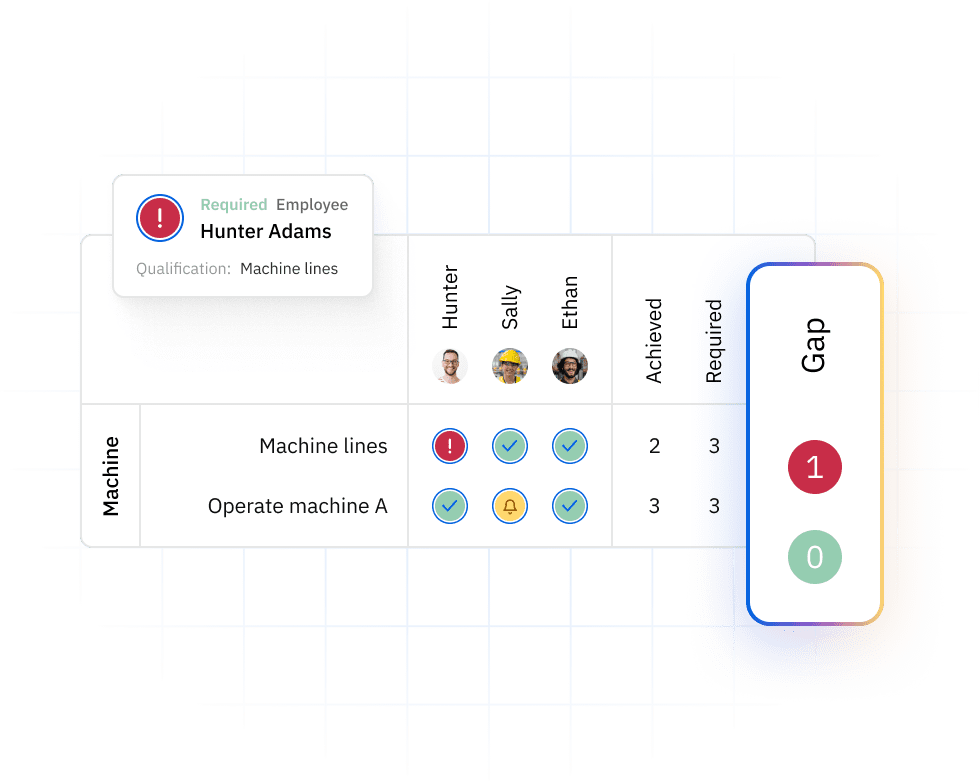
The structure of a competency matrix follows a logical grid format:
Rows represent competencies, typically grouped into categories:
- Core competencies (required across all roles)
- Functional/technical competencies (role-specific expertise)
- Leadership competencies (for supervisors and managers)
- Compliance competencies (regulatory requirements)
Columns represent employees or roles within the organization.
Cells contain proficiency levels, using either:
- Numeric scales (1-4 or 1-5)
- Descriptive labels (Novice / Practitioner / Expert)
- Color coding (Red/Yellow/Green for visual clarity)
Standard components from best-practice frameworks include required competencies (what the role demands), available competencies (what employees currently possess), job descriptions/role profiles, defined proficiency levels, and a competency assessment tool to measure capabilities objectively.
Competency matrix vs competency framework / model
It’s important to distinguish between related concepts:
A competency framework or model is a comprehensive list of competencies and their behavioral indicators across roles. It defines the competencies themselves and what good performance looks like at different levels.
A competency matrix takes that framework and creates a visual mapping of those competencies versus roles or people, adding proficiency levels to create an operational tool for day-to-day management. Take a look at competency management software for tracking matrices here.
How is a competency matrix used in team & workforce management?Copied
Competency matrices serve multiple purposes across different organizational functions, from daily operations to strategic planning. Here’s how different teams leverage this tool:
Day-to-day team management & project staffing
Managers use team competency matrices for immediate operational decisions:
When assembling project teams, the matrix quickly identifies experts versus practitioners versus novices for specific competencies. This ensures projects have the right skill mix while avoiding overloading top performers.
For workload balancing, managers can see at a glance who has capacity to take on new responsibilities and where single points of failure exist. When someone is absent, the matrix shows who can step in based on their competency levels.
Consider a software development team planning a new project. The manager categorizes needed competencies into topics (cloud architecture, security), tools/technologies (AWS, Docker), processes (agile, CI/CD), and soft skills (stakeholder communication). Each team member is marked with R/Y/G status, instantly revealing whether the team has the required capabilities or needs external support.
HR, L&D, and performance management
From an HR systems perspective, competency matrices drive strategic talent initiatives:
Learning and development teams use matrices to identify skill and competency gaps systematically, then plan targeted training programs. Instead of generic training for all, they can focus resources where they’re needed most.
Performance reviews become more objective when tied to behavioral expectations at each competency level. For instance, “Level 3 communication” has clear criteria different from “Level 4 communication,” removing ambiguity from evaluations.
Succession planning gains clarity when matrices show which employees are developing toward higher-level competencies. HR can identify high-potential employees and create development paths to prepare them for future roles.
Compliance, audits, and risk management
For regulated industries, competency matrices are essential for maintaining compliance and passing audits:
Organizations track certifications, mandatory competencies, and expiry dates using live competency matrices. This improves audit readiness and reduces compliance risk significantly. When auditors arrive, companies can instantly demonstrate that all personnel meet required competency standards.
For example, a pharmaceutical production site uses a competency matrix to prove that everyone operating sterile equipment has current training and valid certification. The matrix shows not just who’s qualified today, but when recertification is needed, preventing compliance gaps.
Strategic workforce planning
Competency matrices help align workforce capabilities with strategic objectives:
When organizations face new technologies, market expansions, or regulatory changes, matrices reveal whether current competencies match future needs. Leadership can make informed decisions about hiring, training, or restructuring based on competency gap analysis.
This strategic view transforms competency matrices from operational tools into instruments for organizational change and adaptation.
How to create a competency matrix (step-by-step)Copied
Building an effective competency matrix requires systematic planning and execution. Here’s a proven six-step process:
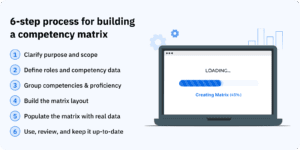
Step 1 – Clarify your purpose and scope
Before diving into matrix creation, answer fundamental questions:
Is this for one team, one plant, or the whole company? Starting with a pilot scope (such as one department) keeps the project manageable and allows you to refine your approach before scaling.
Are you focusing on technical competencies, soft skills, leadership, or all of them? Different objectives require different competency sets. A production team might emphasize technical and safety competencies, while a sales team prioritizes communication and negotiation skills.
What decisions will this matrix support? Whether for daily staffing, annual reviews, or succession planning affects how detailed your matrix needs to be.
Step 2 – Define roles and collect competency data
Gathering accurate competency data requires multiple inputs:
Start with job descriptions to understand formal requirements. Then conduct subject matter expert (SME) interviews to capture what actually makes someone successful in the role. Use behavior event interviews with high performers to identify critical competencies that differentiate excellence.
Consider surveys to gather input from multiple stakeholders and observe high performers in action to validate which competencies truly matter.
The output should be a comprehensive list of competencies per role, with clear definitions and behavioral indicators that remove ambiguity about what each competency means.
Step 3 – Group competencies and define proficiency levels
Organize competencies into logical categories:
Core competencies: apply across all roles, communication, collaboration, problem-solving. These form the foundation of organizational culture.
Functional/technical competencies: are role-specific, operating specific equipment, using particular software, applying specialized knowledge.
Leadership/managerial competencies: apply to supervisors and above, coaching, strategic thinking, change management.
Choose a proficiency scale that works for your organization:
Numeric scales (1-5) offer precision and are easy to analyze statistically. Descriptive scales (Novice / Intermediate / Advanced / Expert) are more intuitive but require clear behavioral anchors to ensure consistent interpretation.
Step 4 – Build the matrix layout
Create the physical or digital structure:
Rows list competencies, grouped by category for easy navigation. Columns represent employees or roles. Cells contain proficiency values.
Many teams start with Excel skills matrix or Google Sheets for simplicity. However, this approach quickly becomes complex and error-prone at scale, with version control challenges, formula errors, and difficulty consolidating data across multiple sites or teams.
Step 5 – Populate the matrix with real data
Combine multiple assessment methods to avoid bias:
Self-assessments give employees ownership but may be inflated. Manager assessments provide oversight but might miss technical nuances. Objective test results and certification records provide evidence-backed ratings.
Triangulating these sources creates a more accurate picture. Stress the importance of evidence-backed ratings, certificates, completed projects, performance metrics, rather than subjective impressions.
Step 6 – Use, review, and keep it up-to-date
A competency matrix is only valuable if it’s current and actively used:
Integrate the matrix into project staffing decisions, performance reviews, and training planning. This ensures it remains relevant rather than becoming shelfware.
Review periodically, quarterly for dynamic environments, annually for stable ones, to reflect new training, personnel changes, and evolving role requirements.
As organizations grow, spreadsheets become inadequate for real-time updates across multiple sites. This is when dedicated competency management software becomes essential.
Download AG5’s free competency matrix template to get started with a professional framework you can customize for your organization. For more options, explore our skills matrix templates.
Competency matrix vs. skills matrix: what’s the difference?Copied
While often used interchangeably, competency matrices and skills matrices serve different purposes and operate at different levels of strategic importance.
Definitions side-by-side
A skills matrix is a grid that maps specific skills, like “TIG welding,” “SAP navigation,” or “First Aid certification”, against employees or roles to track technical capabilities and identify immediate gaps.
A competency matrix is a broader grid that maps competencies, combinations of skills, knowledge, behaviors, and attitudes, against roles or individuals. It’s more strategic and performance-oriented, focusing not just on what people can do, but how effectively they perform in their roles.
Key differences (scope, application, and use cases)
The distinctions become clear when examining their characteristics:
Scope:
- Skills matrix: Narrower, focused on specific technical or functional abilities
- Competency matrix: Broader, includes soft skills, behaviors, and how work gets done
Typical application:
- Skills matrix: Operational planning, shift scheduling, task-specific training, compliance tracking
- Competency matrix: Role design, career frameworks, leadership development, performance management, succession planning
Time horizon:
- Skills matrix: Here-and-now capabilities for immediate needs
- Competency matrix: Long-term expectations for roles and career development
How skills and competency matrices work together
Rather than choosing one or the other, leading organizations use both tools complementarily:
The competency matrix provides the strategic backbone, defining what excellence looks like in each role and setting development priorities. The skills matrix offers the granular, day-to-day view needed for operational decisions.
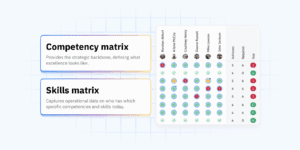
In AG5’s system, skills matrices capture who has which specific competencies and skills today, providing real-time operational data. Underneath, companies maintain competency frameworks for each role, aligning training and assessments to strategic competency development goals. This integrated approach creates a true competency management system that goes beyond basic tracking.
Competency matrix examples (with templates)Copied
Seeing real examples helps clarify how competency matrices work in practice. While structures remain similar across industries, the specific competencies and proficiency scales vary based on organizational needs.
Example 1 – Team-level competency matrix for a production line
Rows (competencies):
- Machine operation
- Safety & PPE compliance
- Quality checks
- Troubleshooting
- Documentation
- Teamwork/communication
Columns: Operators A through F, plus shift leads
Cells: Using a 1-4 scale where:
- 1 = Awareness (understands basics, requires supervision)
- 2 = Can perform with supervision
- 3 = Can perform independently
- 4 = Can train others
This matrix helps managers quickly identify gaps for specific shifts and plan cross-training. If Operator C is the only Level 4 in troubleshooting on the night shift, that’s a risk requiring immediate attention.
Example 2 – Role-based competency matrix for a Quality Manager
Rows (competencies):
- Regulatory knowledge (ISO 9001/14001, FDA requirements)
- Root cause analysis
- Audit preparation and execution
- Stakeholder communication
- Leadership and team development
- Digital tools & reporting systems
Columns: Junior QM, QM, Senior QM, Head of Quality
Cells: Proficiency expectations per level (L1-L4)
This structure clarifies career progression expectations. A Junior QM might need L2 proficiency in audit preparation, while a Senior QM requires L4. This transparency helps employees understand exactly what’s needed for advancement.
Example 3 – Leadership competency matrix
Rows (Competencies):
- Results orientation
- Coaching & feedback
- Decision-making
- Change management
- Cross-functional collaboration
- Creating psychological safety
Columns: Team lead, Department head, Director, VP
Use: This matrix supports leadership development programs and succession planning. It shows which competencies become more critical at higher levels and helps identify high-potential employees ready for development.
Download a free competency matrix template and see how to maintain it automatically in AG5 for real-time visibility across your organization.
Managing competency matrices at scale with AG5Copied
While Excel-based matrices work for small teams, they quickly become unwieldy as organizations grow. Common pain points include:
- Version control chaos with multiple spreadsheets
- Formula errors that cascade through the matrix
- Difficulty combining data from multiple sites or teams
- Limited audit trails for compliance
- No real-time updates or alerts
For a comprehensive comparison, see our skills matrix software guide.
How AG5 transforms competency management
AG5’s skills matrix software addresses these challenges through:
Real-time skills & competency dashboards: that provide instant visibility across all teams and sites. Managers see current competency levels, gaps, and trends without manually consolidating spreadsheets.
Evidence-backed records: link competencies to certificates, training completions, and assessment results. This creates an audit-ready system that proves compliance instantly.
Automated alerts: notify managers when certifications approach expiry or when minimum competency levels aren’t met. This proactive approach prevents compliance gaps and operational risks.
Easy reporting: generates management reviews, audit reports, and gap analyses with a few clicks rather than hours of spreadsheet manipulation.
Ready to move beyond spreadsheets? Book a demo to see how AG5 can transform your competency management.
Key takeawayCopied
Competency matrices are essential tools for modern workforce management, providing clarity on capabilities, gaps, and development needs. While the concept is straightforward, mapping competencies against roles with proficiency levels, the implementation determines success.
Starting with a clear purpose, systematically gathering competency data, and maintaining the matrix with discipline creates a valuable management tool. As organizations scale, transitioning from spreadsheets to dedicated software like AG5 ensures the matrix remains accurate, accessible, and actionable.
Whether you’re managing a single team or coordinating competencies across multiple sites, the principles remain the same: define what excellence looks like, assess where you are today, and systematically close the gaps. With the right approach and tools, competency matrices transform from static documents into dynamic instruments for operational excellence and strategic workforce development.
FAQs Copied
-
What is a competency matrix in HR?
-
What's the difference between a competency matrix and a skills matrix?
-
How do I create a competency matrix for my team?
-
How often should a competency matrix be updated?
-
Who should own the competency matrix in an organization?
-
How does a competency matrix help with audits and compliance?
-
Can I start my competency matrix in Excel and later move to software like AG5?
Author Copied

Revisions Copied
Written by: Rick van Echtelt
Copy edited by: Adam Kohut