Skills management software for construction crews and certifications
Skills management software for construction helps teams track worker skills, certifications, and expiries in one system. Assign qualified crews, prevent lapses, and generate audit-ready records to support safe, compliant construction operations.

 Reviewed by Adam Kohut
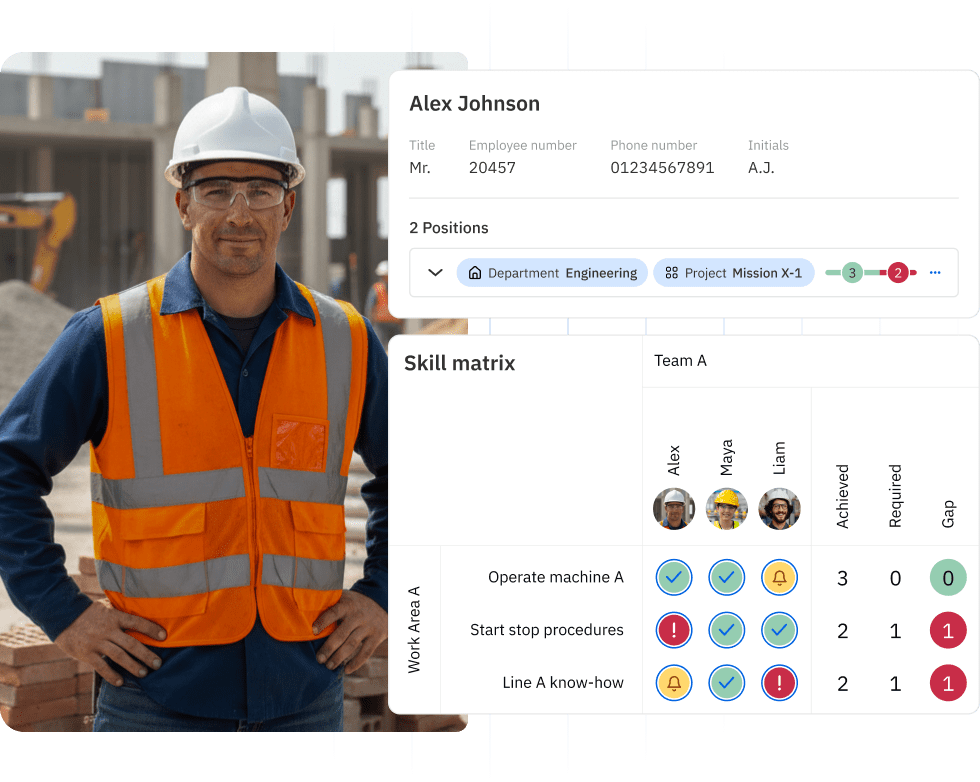
Construction sites run on skill, precision, and compliance. When your crew shows up to a job site, you need to know that everyone is qualified for the tasks ahead. Yet many construction companies still track worker skills, certifications, and training using spreadsheets or outdated systems that make it hard to answer simple questions like:
- Who is certified for this task?
- When does this training expire?
- Can we staff this project with our current crew?
Skills management software for construction helps you track worker qualifications in real time, so you can assign the right people to the right jobs, stay compliant with safety requirements, and avoid delays caused by expired certifications. In this guide, we’ll cover what skills management software does, what skills construction workers need, and how to track construction management certifications effectively.
What is skills management software for construction?Copied
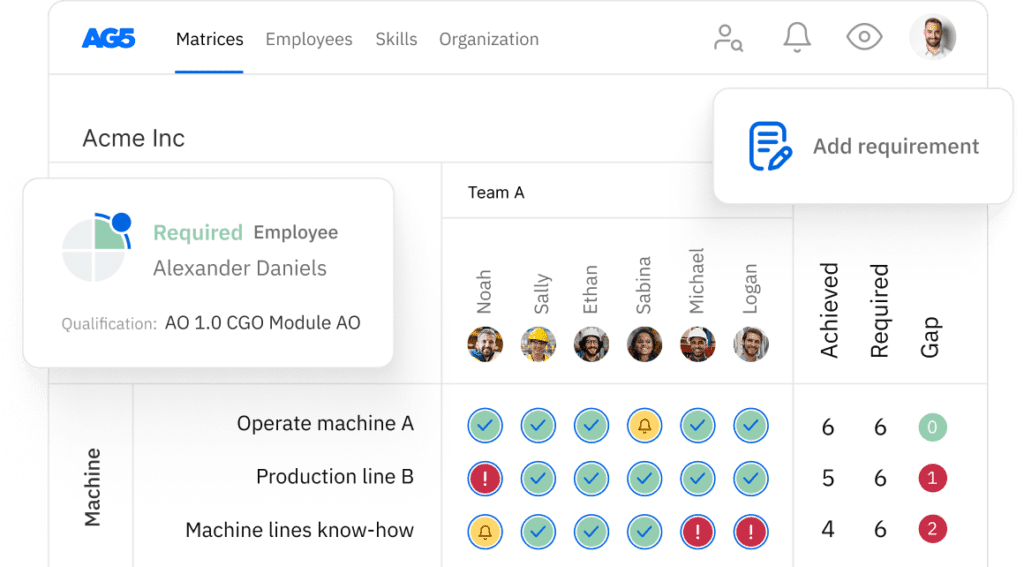
Skills management software for construction is a digital tool that helps you track, organize, and verify worker skills, qualifications, and certifications across your organization. Instead of hunting through folders or spreadsheets, you get a clear view of who can do what, and when their credentials expire.
This type of software acts like a competency management system for construction teams. It stores information about each worker’s training, licenses, and skill levels, then gives managers the tools to match people to projects based on verified readiness.
Here’s what construction skills management software typically helps you do:
Track worker skills and certifications. Store details about each person’s qualifications, from basic safety training to specialized trade skills.
Monitor expiration dates. Get alerts before critical certifications or training requirements lapse, so you can schedule renewals in advance.
Assign qualified crews to jobs. Match workers to tasks based on verified skills, reducing the risk of delays or safety issues.
Generate reports for audits. Quickly produce proof of worker qualifications when clients, auditors, or safety inspectors request documentation.
For construction companies managing multiple sites or subcontractors, this software removes the guesswork from workforce planning. You can see skill gaps across your organization and make informed decisions about training, hiring, and project staffing.
Why construction companies need skills trackingCopied
Construction work depends on verified competence, especially when working at height, operating heavy equipment, or handling hazardous materials. When skills tracking lives in spreadsheets or individual manager’s heads, several problems emerge.
First, you face uncertainty about who is qualified for high-risk tasks. Without a central system, managers rely on memory or ask around to figure out who holds the right certifications. This slows down project planning and increases the risk of assigning unqualified workers to dangerous work.
Second, expired training catches you by surprise. Safety certifications and equipment licenses often have expiration dates. When you don’t track these dates systematically, you discover gaps at the worst possible time, right when you need someone for a specific job. As a result, you end up with last-minute crew changes, project delays, and frustrated clients.
Third, audits and inspections become stressful. When a client, safety inspector, or regulatory body asks for proof of worker qualifications, you scramble to collect documents from different managers or file cabinets. This reactive approach wastes time and creates compliance risk.

Construction skills management software solves these problems by creating a single source of truth for worker qualifications. Everyone – from project managers to safety officers – can access current, accurate information about crew capabilities. This makes it easier to plan confidently and respond quickly when circumstances change.
Essential skills for construction workersCopied
When people search for “skills for construction worker” or “what skills do you need to be a construction worker,” they’re often looking for a clear list of capabilities that matter in the field. Whether you’re hiring, training, or building a skills matrix, understanding these core competencies helps you identify what to track and develop in your workforce.
Core skills every construction worker needs
These are the fundamental skills that apply across most construction roles, regardless of trade or specialization:
Safety awareness and rule adherence. Following PPE requirements, recognizing hazards, and complying with site safety procedures keeps everyone protected.
Ability to follow standard work procedures. Understanding and implementing established processes ensures consistent quality and reduces rework.
Tool handling and equipment familiarity. Competent use of hand tools, power tools, and basic job site equipment for your specific role.
Communication and teamwork. Coordinating with other trades, reporting issues promptly, and supporting crew members to keep work flowing.
Quality mindset. Catching mistakes early, performing basic quality checks, and documenting work when needed.
These skills form the baseline for safe, effective work on any construction site. When you track these capabilities in your construction skills management system, you create a foundation for assigning workers to appropriate tasks.
Trade-specific and task-based skills
Beyond core competencies, construction workers need specialized skills that depend on their trade and the specific tasks they perform. These often require formal training or certification:
Site setup and safety controls: Installing signage, creating exclusion zones, and implementing traffic management measures.
Working at height. Using fall protection equipment, scaffolding, and aerial lifts safely, often requiring specific certification.
Lifting and rigging. Understanding load limits, proper rigging techniques, and signaling procedures for crane operations.
Concrete work. Mixing, pouring, finishing, and working with formwork and rebar systems.
Mechanical and electrical installation. Installing HVAC, plumbing, or electrical systems according to code requirements.
Blueprint reading. Interpreting construction drawings, specifications, and technical documents accurately.
Recording these specialized skills in your system helps you quickly identify who can handle specific tasks. For example, if a project requires certified welders or licensed electricians, you can filter your workforce by qualification and assign the right people immediately.
Supervisory and leadership skills
Foremen and supervisors need a different skill set that focuses on managing people and coordinating work. These capabilities are worth tracking in your construction skills management system because they determine who can lead crews effectively:
Crew allocation based on competence. Assigning workers to tasks that match their verified skills and certification status.
Safety leadership. Conducting toolbox talks, enforcing safety procedures, and modeling safe behaviors on site.
Progress tracking and problem escalation. Monitoring work completion, identifying issues early, and communicating with project managers.
Coaching and cross-training. Developing less experienced workers and building backup capacity across the crew.
By tracking both technical and leadership skills, you can make smarter decisions about promotions, succession planning, and training investments. You’ll know exactly who has the capabilities to step into leadership roles when opportunities arise.
To organize this information effectively, many construction companies use a construction skills matrix template that maps skills against worker names. This visual format makes it easy to spot gaps and plan training priorities.
How to assign qualified crews to jobsCopied
One of the biggest advantages of construction skills management software is the ability to match workers to projects based on verified qualifications rather than guesswork. This capability transforms how construction companies approach crew planning.
Start by mapping required skills to specific roles and tasks. For example, a commercial concrete pour might require workers with current confined space training, forklift certification, and concrete finishing experience. When you define these requirements clearly in your system, you can search for workers who meet all criteria.
This approach reduces schedule disruption from missing authorizations. Instead of discovering qualification gaps when workers arrive on site, you identify issues during planning. As a result, you can arrange coverage, schedule training, or adjust timelines before problems impact your project.
Skills-based crew planning also reduces your over-reliance on “tribal knowledge”, the informal understanding of who can do what that usually lives in managers’ heads. When that knowledge exists in a system instead, you can make consistent staffing decisions even if key managers are unavailable.
Finally, matching workers to jobs based on current qualifications reduces site risk. You eliminate the possibility of assigning someone with expired training or missing certifications to critical tasks. This protects both your workers and your company from safety incidents and compliance violations.
Identifying and closing skill gapsCopied
Construction skills management software helps you see where training is needed across your workforce before gaps cause problems. This proactive approach improves both safety and operational efficiency.
With the right tools, you can view skill coverage by site, crew, role, or project. For example, you might discover that only two people on your team have current excavation safety training, creating a bottleneck if both are unavailable. Or you might find that an entire crew lacks the certification needed for an upcoming job.
This visibility lets you prioritize training based on operational risk. Instead of scheduling training randomly or waiting for certifications to expire, you can target the skills that matter most for your active and upcoming projects.
Gap analysis also supports strategic cross-training. When you know which workers already have similar skills or partial qualifications, you can make smart decisions about who to train next. This builds backup capacity so that absences or turnover don’t stop critical work.
By connecting skills tracking to training planning, you move from reactive firefighting to proactive workforce development. Workers get the training they need to advance their careers, and your company builds a more capable, flexible workforce.
Tracking certification expirations and renewalsCopied
Many construction delays start with a simple problem: the person you need for a task is not currently authorized to do it. Safety training expires, equipment licenses lapse, and suddenly you’re scrambling to find a replacement or reschedule work.
Construction skills management software prevents these disruptions by tracking certification status and sending alerts before critical training expires. Instead of discovering expired credentials when you need someone, you get advance notice—often 30, 60, or 90 days ahead of expiration.
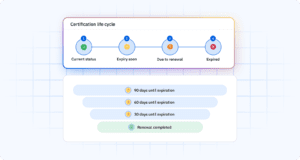
This early warning system gives you time to schedule renewals during natural breaks in work or downtime between projects. Workers can complete their training without rushing, and you avoid last-minute scheduling chaos.
For companies with multiple sites or large workforces, automated alerts eliminate the need for managers to manually track dozens or hundreds of expiration dates. The system monitors certifications continuously and flags upcoming renewals across your entire organization.
When your software integrates with learning management systems or training providers, the renewal process becomes even smoother. Workers receive notifications, complete required training, and have their records automatically updated—all without manual data entry.
This approach supports safer sites and more predictable project delivery. You maintain compliance with regulatory requirements and client expectations while reducing the administrative burden on your managers and HR team.
Understanding construction management certificationsCopied
When people search for “construction management certification,” they’re usually looking for information about professional credentials like Certified Construction Manager (CCM), Certified Professional Constructor (CPC), or Construction Manager-in-Training (CMIT). These certifications demonstrate advanced knowledge of construction management principles, project delivery, and leadership.
It’s important to understand that construction skills management software doesn’t issue or award these certifications – those come from professional organizations and educational institutions. However, this software plays a critical role in tracking these credentials once your team members earn them.
Here’s what construction skills management software does for construction management certifications:
Store certification details. Record who holds which credentials, including certificate numbers and issuing organizations.
Track expiration dates. Monitor renewal requirements and send alerts before certifications lapse.
Maintain supporting documentation. Keep copies of certificates, transcripts, or other proof in a secure, accessible location.
Generate reports. Produce documentation showing which project managers or supervisors hold specific credentials.
For construction companies that pursue specific projects or clients requiring certified project managers, this tracking capability becomes essential. You can quickly verify that you have the credentialed staff needed to bid on work or demonstrate compliance with contract requirements.
Many construction companies also track continuing education credits required to maintain these certifications. By recording professional development hours alongside certification status, you ensure that your managers stay current with their renewal requirements.
If your organization has specific construction certification tracking needs, you might explore resources through your industry’s construction certifications hub to understand which credentials matter most for your market and project types. For example, you might need to track specific credentials like Certified Construction Manager (CCM), Certified Professional Constructor (CPC), or Construction Manager-in-Training (CMIT) depending on your project requirements and client expectations.
Creating audit-ready reportsCopied
When clients, auditors, or safety inspectors request documentation of worker qualifications, you need to respond quickly with accurate information. Construciton skills management software makes this process straightforward by keeping all qualification data organized and accessible.
Instead of searching through file cabinets or emailing multiple managers, you can generate reports that show exactly who holds which qualifications. These reports might include worker names, certification types, issue dates, expiration dates, and any supporting documentation.
This capability matters for several reasons. First, it demonstrates professionalism and preparedness to clients and regulatory bodies. When you can provide comprehensive qualification reports within hours rather than days, you build trust and credibility.
Second, it reduces compliance risk. During safety audits or regulatory inspections, incomplete or inaccurate records can result in fines, project shutdowns, or loss of contract opportunities. When your skills data is current and well-organized, you minimize these risks.
Third, it saves time for managers and administrative staff. Instead of spending hours compiling certification lists before each audit, they can generate reports automatically. As a result, they can focus on more valuable work that drives projects forward.
Many construction skills management systems allow you to customize reports for different audiences. You might create a summary report for executive review showing overall certification compliance rates, while producing detailed reports for safety audits that include scanned copies of training certificates.
Common challenges in construction skills trackingCopied
Even with software in place, construction companies face several challenges when implementing skills tracking systems. Understanding these obstacles helps you prepare for them and find solutions.
Data entry and maintenance create significant work upfront. Moving information from spreadsheets, paper files, or individual manager’s records into a central system takes time and attention to detail. Many companies underestimate this initial effort and become discouraged.
The solution is to start small and expand gradually. Focus first on critical certifications—those required for high-risk work or regulatory compliance. Once you establish a rhythm for maintaining current information in these areas, you can add additional skills and qualifications.
Inconsistent terminology across sites or teams also causes problems. Different managers might use different names for the same training or certification, making it hard to aggregate data or compare capabilities across locations.
Address this by establishing standard naming conventions for all tracked skills and certifications. Document these standards and train managers on using them consistently. This investment in standardization pays off through cleaner data and more useful reports.
Worker resistance to new systems sometimes emerges, especially if people perceive skills tracking as surveillance or additional administrative work. This resistance can slow adoption and limit the system’s value.
Combat this by communicating the benefits clearly. Help workers understand that skills tracking supports their career development by making their qualifications visible to decision-makers. When training opportunities or promotions arise, documented skills help leaders identify who is ready for advancement.
Choosing the right construction skills management softwareCopied
Selecting skills management software for your construction company requires evaluating several key factors. The right choice depends on your organization’s size, complexity, and specific needs.
Look for software that makes it easy to track both skills and certifications. Construction requires monitoring diverse qualifications – from basic safety training to specialized trade licenses – so your system needs to handle this variety without becoming complicated.
Automated expiration alerts are essential. The system should notify relevant people well in advance of certification renewals. This feature alone can prevent costly project delays and compliance issues.

Reporting capabilities matter tremendously for audits and client requests. Evaluate how easy it is to generate qualification reports, customize them for different audiences, and export data when needed.
Integration with your existing tools improves efficiency. If your company uses specific HR systems, learning management platforms, or project management software, check whether the skills management system can connect with them. These integrations reduce duplicate data entry and improve accuracy.
Finally, consider the user experience for both administrators and workers. Software that’s difficult to navigate or understand will face adoption challenges. Look for clear interfaces, straightforward workflows, and responsive support from the vendor.
AG5 provides skills management software specifically designed for construction teams. It tracks worker skills and certifications, delivers expiration alerts, and generates audit-ready reports, helping you staff projects with confidence and maintain compliance across your organization.
Getting started with skills managementCopied
Construction companies that implement skills management software gain clearer visibility into their workforce capabilities. They can staff projects with confidence, reduce compliance risk, and respond quickly when clients or auditors request qualification documentation.
The key to success is starting with a focused approach. Identify your most critical skills and certifications—those that directly impact safety, compliance, or project delivery. Get those tracked accurately first, then expand to additional qualifications over time.
As a result, you’ll build a system that supports better workforce planning, more efficient training investments, and stronger project execution across your organization.
AG5 provides skills management software designed specifically for construction teams managing worker skills and certifications across multiple sites. The platform tracks qualifications, flags upcoming expirations, and generates reports that help you staff projects with qualified crews.
Ready to see how AG5 can help your construction company track skills and certifications more effectively? Book a demo to explore how the platform works for teams like yours.
FAQs Copied
-
What skills do you need to be a construction worker?
-
What are good skills for a construction worker?
-
What is skills management software for construction?
-
What is a construction management certification?
-
How does skills management software help with crew assignments?
-
How do expiration alerts work?
-
Can skills management software track soft skills?
-
How often should skills data be updated?
Author Copied

Revisions Copied
Written by: Rick van Echtelt
Copy edited by: Adam Kohut